
Insights
Muro's insight engine reads your traffic every hour and writes plain-language observations about what changed and why it matters.
Insights are how Muro turns numbers into something you can act on. Once an hour, Muro looks at your last 24 hours of data, compares it to the baseline, and writes short observations in plain English. You read them. You decide what to do.
You'll find your insights at Dashboard → Insights, and the most important ones land in your daily digest email.
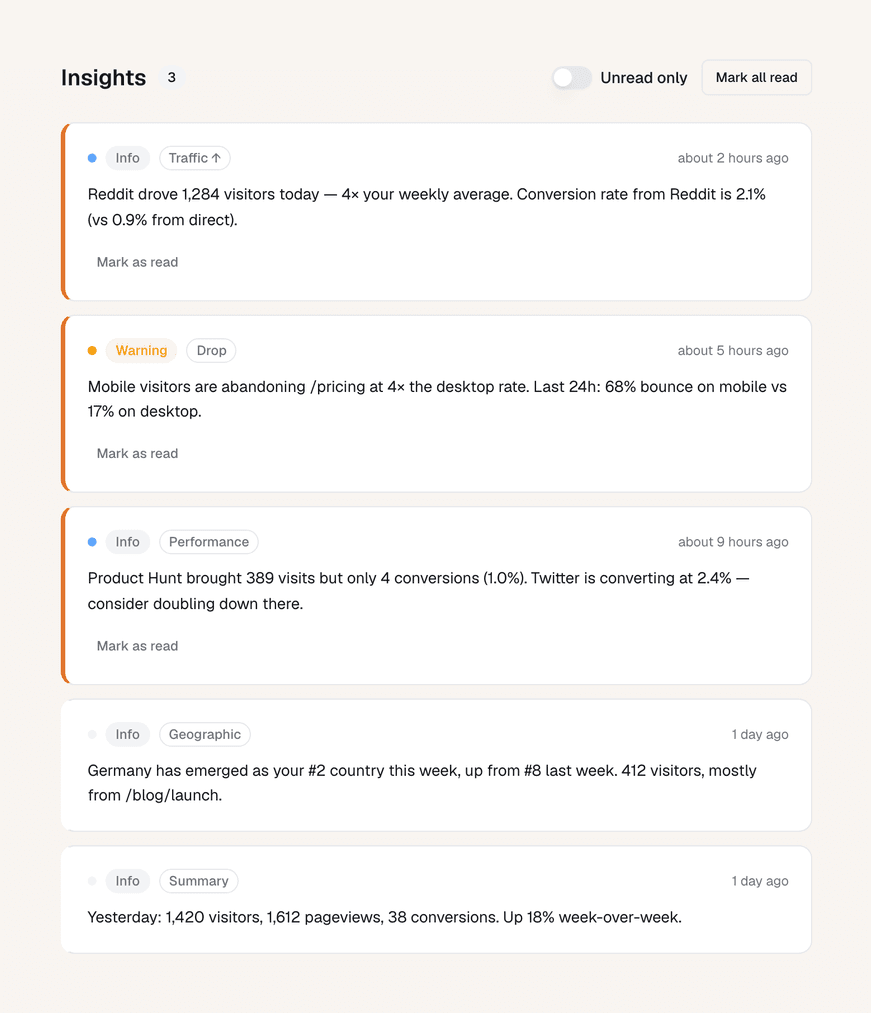
The five things Muro watches for
Each of these is a rule Muro runs against your data. When a rule fires, you get an insight in your feed.
1. A meaningful change in overall traffic
Muro compares the last 24 hours of traffic to the 24 hours before it. If the difference is 20% or more in either direction, you get an insight.
Traffic is up 38% vs yesterday. Most of the lift came from
news.ycombinator.com.
Traffic is down 24% vs yesterday. Your Reddit referrer dropped from 412 visits to 38.
Smaller changes are filtered out so the feed doesn't fill up with noise from normal day-to-day variance.
2. A single referrer taking off
Sometimes overall traffic looks flat, but one source is quietly surging. Muro watches every referrer separately. When one of them more than triples its baseline, you get a heads-up.
producthunt.comis sending 4× more traffic than usual. 540 visits in the last 24 hours vs 110 the day before.
This is how you notice a Product Hunt launch picking up, a Twitter thread going viral, or a backlink starting to send real traffic.
3. Mobile visitors converting much worse than desktop
If your custom event rate is significantly lower on mobile than desktop, Muro flags it. The threshold is roughly 60%: when mobile is at less than 60% of the desktop conversion rate, you'll see an insight.
Mobile visitors are converting 3× worse than desktop on /pricing. Worth checking the page on a phone.
This usually means something is broken on mobile, or the layout is making the call-to-action hard to find.
4. A new country showing up
Muro learns which countries normally send you traffic. When a country that isn't in your baseline starts sending real visits (50 or more in 24 hours), you get an insight.
A new country is in your top 10: Vietnam. 84 visits in the last 24 hours.
This is useful for spotting unexpected reach, a translated post going viral abroad, or paid traffic from a new region.
5. A daily summary
Once a day, Muro writes a short summary of what happened yesterday. This isn't an anomaly. It's a recap, so you always have one insight that puts the day in context, even on quiet days.
Yesterday: 412 visitors, 3 signups. Top referrer:
news.ycombinator.com. Top page:/.
Severity
Every insight carries a severity, shown as a colored dot on the card:
- Info (blue). Background context. The daily summary is always info.
- Warning (amber). Something to look at, like a 25% traffic drop or a mobile conversion gap.
- Critical (red). Something serious, like traffic falling more than 50% in 24 hours.
Severity doesn't change what an insight says, it just helps you decide what to read first when the feed has a few items.
When insights show up
- The first ones arrive within an hour of install. Muro runs the insight engine once an hour, so as soon as you have a small amount of traffic, you'll start seeing observations.
- Each rule fires at most once per window. Muro deduplicates so you don't get the same "traffic is up 30%" insight every hour for the rest of the day.
- The summary runs once a day at midnight UTC. It always covers the previous full calendar day.
You don't need to configure thresholds, choose which insights to receive, or set anything up. The rules run automatically.
Reading and dismissing insights
In the Insights tab of your dashboard:
- The number next to "Insights" in the sidebar is your unread count.
- Click an insight to mark it as read. The dot indicator disappears.
- Use the Unread only toggle to hide insights you've already seen.
- Click Mark all read to clear the unread count without opening every card.
Insights aren't archived or deleted, just marked read. You can scroll back through the feed any time.
You'll see them in your daily digest too
The most useful insights from the past 24 hours are bundled into your daily digest email at 8 AM in your project's timezone. That way you have a chance to catch up on anything you missed without opening the dashboard.
See Daily digest email for more on what's in the email and how to manage it.
What's next
The Dashboard
A tour of the Muro dashboard: KPI cards, the visitors chart, filters, time ranges, and the click-to-filter trick that ties them all together.
Daily digest email
Every morning at 8 AM in your timezone, Muro sends a short email that recaps yesterday and surfaces anything you should look at today.